A Doctor Who-inspired regeneration system. Survive death with 12 regeneration cycles, evolve your Time Lord biology through a skill tree, craft advanced Time Lord technology, and shape your next incarnation — all in one Fabric mod.
⚡ Fabric Mod✦ MC 1.20.14 Regen Styles43 Time Lord SkinsLGPL-3.0
Mod at a Glance
Regenerations12 per watch
Public styles4
Bundled skins43
Stage 1 delayUp to 2 min
Structures5 types
Advancements22
⚖️ LicenseLGPL-3.0
What is RegenCraft?
RegenCraft adds a fully-featured Time Lord regeneration system to Minecraft. Instead of dying permanently, eligible players enter a two-stage regeneration sequence — first a tense countdown where you can still act and choose to delay, then a spectacular particle-and-sound sequence that heals you completely and optionally transforms your appearance.
Fob Watch
Craft the Fob Watch to awaken your Time Lord nature and gain 12 regeneration cycles.
🔄
Two-Stage Regen
A two-stage regeneration sequence: a 30-second countdown where you can delay and prepare, then a full active sequence that heals you completely.
4 Regeneration Styles
Pick from 4 different regeneration styles, each with its own sound and length. More styles are coming.
World Structures
Discover Time Lord Refuges and TARDIS structures scattered across most overworld biomes.
RegenCraft is a Fabric mod for Minecraft 1.20.1. Follow these steps to get it running.
1 — Install Fabric
Download the Fabric Installer from fabricmc.net. Run it and select Minecraft 1.20.1 with Fabric Loader 0.14.22 or higher. Then launch the game once to generate the mods folder.
Download regeneration-1.0.0.jar from the mod page and place it in your .minecraft/mods folder alongside the libraries above.
4 — Launch
Open the Minecraft Launcher, select the Fabric 1.20.1 profile, and click Play. RegenCraft will load automatically.
💡
Multiplayer servers
GeckoLib, Fabric API, and RegenCraft are required on both the server and every client.
Becoming a Time Lord
To use the regeneration system, you must awaken your Time Lord nature using a Fob Watch. The watch is crafted from Steel Ingots, circuits and a Chronon Core — see Recipes for the full chain.
The Fob Watch
The Fob Watch is a permanent item — it is never consumed or destroyed. It has two visual states (CLOSED and OPEN) and a durability bar that shows how many regenerations are currently stored inside (0–12). The bar colour shifts from dark red → orange → gold as it fills.
Closed
Regenerations are sealed inside. Right-click to release them into yourself and flip the watch open.
Open
Regens have been released. Shift+right-click to deposit regens back in. The watch snaps closed automatically when all 12 are stored again.
Right-click — Releasing Regenerations
Hold the Fob Watch and right-click:
Watch is CLOSED with charges stored — the watch opens, releasing all stored regens into you. If you are not yet a Time Lord, you are awakened as one. If already a Time Lord, your count is topped up (capped at your max). Watch flips to the open-lid model.
Watch is OPEN with charges stored — releases those charges back to you (useful if you deposited regens during a grace period and want them back).
Watch is OPEN and empty — nothing to release; you get a reminder to shift+right-click to deposit.
Already at max regens — nothing to top up; the watch stays closed and shows a "cycle already full" message.
💡
The watch stays in your inventory
A freshly crafted Fob Watch starts CLOSED with 12 charges. Opening it releases those regens into you and flips the lid open. You keep the watch — fill it back up by depositing regens, then pass it to another player or open it yourself later.
Shift + Right-click — Depositing a Regeneration
Shift + right-click while holding a Fob Watch to move one regeneration from yourself into the watch:
You must be a Time Lord with at least 1 regeneration remaining.
During the grace period, you must have more than 1 regen — you cannot deposit your last one while the timer is active.
Each deposit increments the watch's stored count by 1 and is shown in the tooltip and durability bar.
When stored charges reach 12, the watch snaps shut automatically.
You remain a Time Lord even with 0 regens in your body, as long as the watch is holding them.
The watch can be given to any player — they can right-click it to receive the stored regenerations.
Checking Your Status
Run /regeneration info for a full state dump: Time Lord status, regen count, current sequence stage, flame colour, current skin, skin-change setting, and regeneration version.
Regeneration Stages
When you take fatal damage as a Time Lord, death is intercepted and you enter a two-stage sequence. You can also trigger it voluntarily at any time.
Stage 1
Pending Regeneration
Free to move, fight, build
Player damage reduced by 20%
Environmental damage still applies
30s countdown HUD ring (no action bar)
Empty-hand punch a new block → +30s (up to 3×)
Max total delay: 2 minutes
No cycle consumed yet
timer ends or triggered
Stage 2
Active Regeneration
1 cycle consumed
Fully invulnerable & frozen
Particles scale with progress
Chosen sound plays in full
Camera auto-switches to front
Full heal on completion
Stage 1 — Pending Regeneration
You enter Stage 1 the moment fatal damage is intercepted, or immediately when you press =. You are free to move, fight, and build during this stage — movement is only locked once Stage 2 begins.
A countdown ring (radius 14 px, drawn near the top-centre of the screen at y=28) appears via PendingRegenOverlay. The ring colour changes based on how much of the current segment has elapsed: green (0–50% elapsed) → yellow (50–80%) → red (80–100%). The remaining whole seconds are shown in the centre in gold, turning red when 5 or fewer seconds remain.
Below the ring, a hint text reads "Punch the ground to delay (N left)" while extensions remain, or "Regeneration is inevitable..." when all extensions are used up. There is no action bar message — the HUD ring is the sole indicator.
A hand glow sound plays once at the start of the pending stage.
A critical stage warning sound plays when there are 5 seconds or fewer left on the current countdown segment, giving you a heads-up before Stage 2 locks in. It resets and can play again each time you extend the timer.
Subtle particles trickle around you every few ticks (only for the default regeneration version).
Punching the ground — left-clicking a block with an empty hand on a block you haven't punched before — adds 30 seconds to the countdown. You can do this up to 3 times (configurable), for a maximum of 2 minutes total (30s base + 3 × 30s). Clicking the same block again counts as normal mining, not a delay punch. Holding any item makes left-click behave as normal mining with no delay granted.
Press =again while pending to skip the rest of the countdown and begin Stage 2 immediately.
An operator can run /regeneration trigger <player> to force Stage 2 to begin.
⚠️
You are not fully invulnerable in Stage 1
Damage from other players is reduced by 20% (you take 80% of incoming player damage). However, all environmental damage — mobs, fall damage, fire, explosions — passes through completely unmodified. If you die during Stage 1, the sequence is cancelled, no regeneration cycle is consumed, and the normal death proceeds.
📌
No cycle consumed in Stage 1
A regeneration cycle is only consumed when Stage 2 begins. If you die during Stage 1 (from mobs, fall damage, etc.) your regen count is untouched.
Stage 2 — Active Regeneration
One cycle is consumed and the full sequence begins:
Duration matches the exact length of your chosen regeneration sound (11–54 seconds depending on version).
Camera auto-switches to third-person front view.
You are frozen in place and fully invulnerable for the entire sequence.
Glowing particles in your chosen flame colour swirl around you, intensifying toward the end with a final burst.
Action bar shows: "Regenerating… X regenerations remaining", refreshed every second.
On completion
You are fully healed, fed, and re-oxygenated. Any fire is extinguished.
Movement and normal camera perspective are restored.
You receive Regeneration II and Fire Resistance for a short time.
Action bar: "Regeneration complete. X remaining" — or "This is your final body." if you're out.
A 3-minute grace period begins (configurable via gracePeriodSeconds). During this window you cannot voluntarily trigger Stage 1 with =, and if you take fatal damage you die normally — Stage 1 does not activate.
📌
Skin change happens mid-sequence, not at the end
If skin changing is enabled, the new skin is applied at the halfway point of Stage 2 (when particles are ramping up), not when the sequence finishes. For the watcher version specifically, the change is delayed to tick 260 (≈13 s) to coincide with the Watcher entity merging with the player.
🛡️
Safety watchdog
A tick-based watchdog monitors Stage 2. If the sequence timer ever exceeds its target duration without completing, it is force-completed — you can never get permanently stuck.
Running Out of Regenerations
Once all 12 regenerations are used, the next fatal hit kills you normally. Neither stage triggers. After your last regen the action bar will read "This is your final body."
Regeneration Versions
RegenCraft has 4 public regeneration styles available to all players. Each has its own sound effect and the Stage 2 duration is automatically tied to the audio length — the sequence ends exactly when the track finishes.
📌
WIP versions are dev-only
Seven more styles (regen_1 through regen_7) are in the works but not yet public — they won't show up in your GUI or commands.
Public Versions
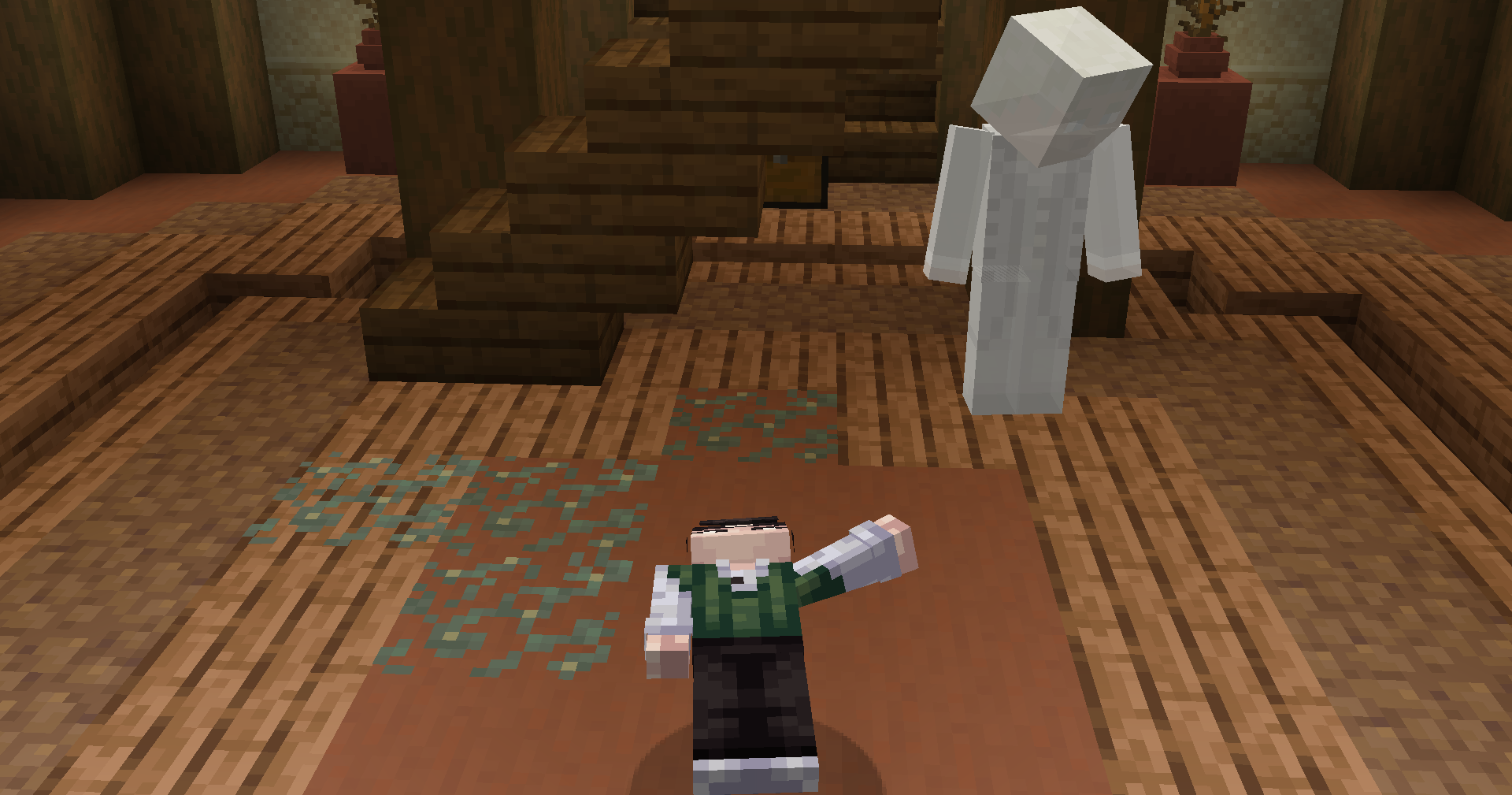
Each version has a distinct sound and visual energy. Here are screenshots of each public style in action:
default — ~54s
watcher — ~17s
regen_0 — ~16s
troughton — ~12s
default~54.1 s
regen_0~16.1 s
troughton~12.2 s
watcher~17.2 s
📌
Names are temporary
Version IDs are based on sound file names for now. Proper Doctor Who-style names are planned for a future update.
Changing Your Version
Preferences GUI — press [ and use the < / > arrows next to the version name.
Command — /regeneration version <name>
New Time Lords start on default (~54 seconds). The GUI and command only show versions you have access to.
Regeneration Skins
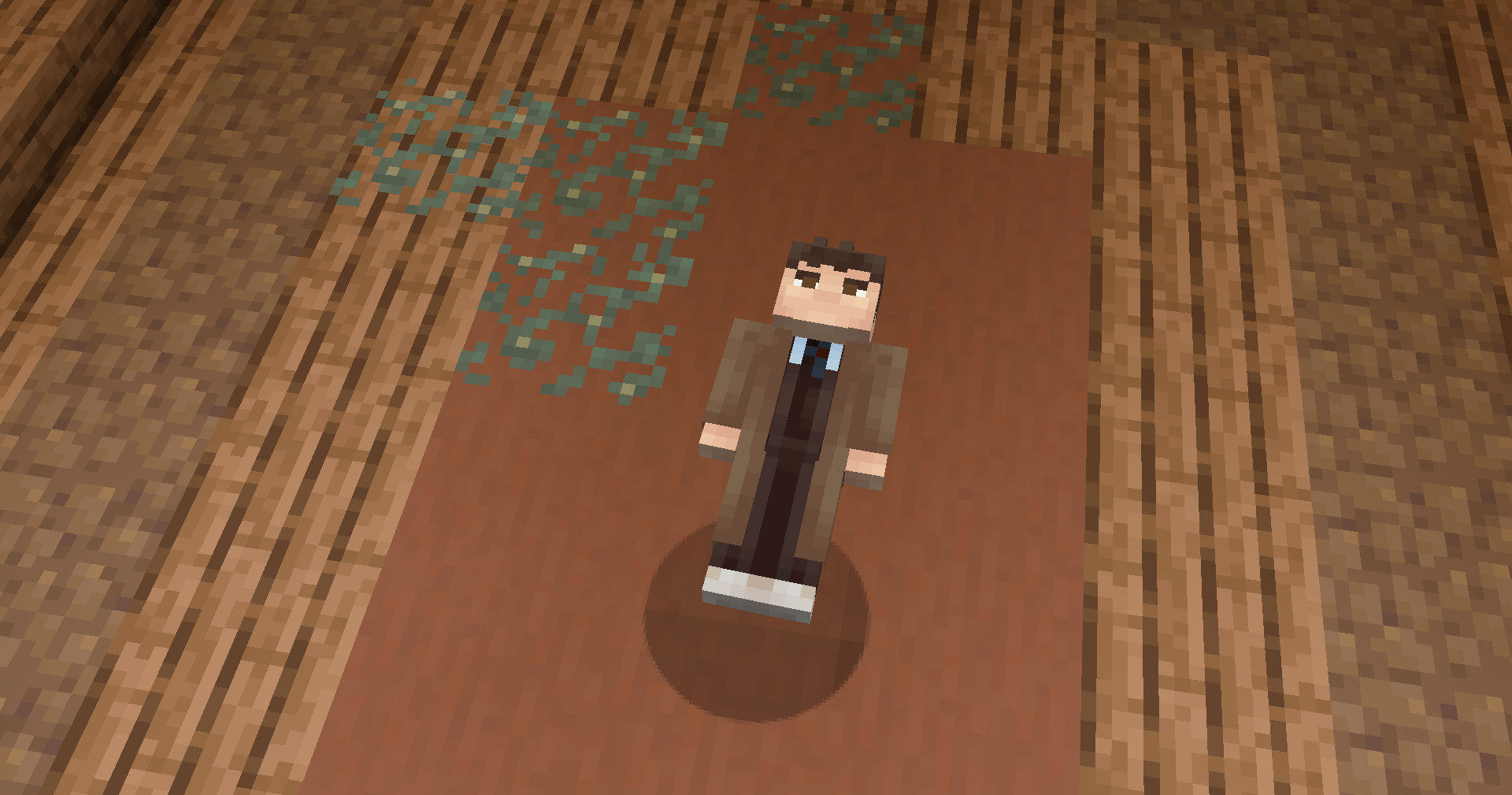
RegenCraft comes with 43 Time Lord skins. When a regeneration completes, a different skin is picked at random and everyone on the server sees the change straight away.
Toggling Skin Changes
Skin changing is a per-player toggle:
Preferences GUI — press [ and click "Change skin on regeneration: ON/OFF". Takes effect immediately.
Command — /regeneration skinswap on / /regeneration skinswap off
Check current setting — /regeneration skinswap (no argument)
When disabled, completing a regeneration leaves your current appearance — including your original Minecraft skin — completely untouched.
Arm Styles
The 43 bundled skins cover both slim (Alex-style) and default (Steve-style) arm models. The correct model is applied automatically — you don't need to do anything.
Custom skin support is planned — you'll eventually be able to pick which skins your regenerations cycle through rather than using the built-in pool. More info when it's closer to ready.
Preferences GUI
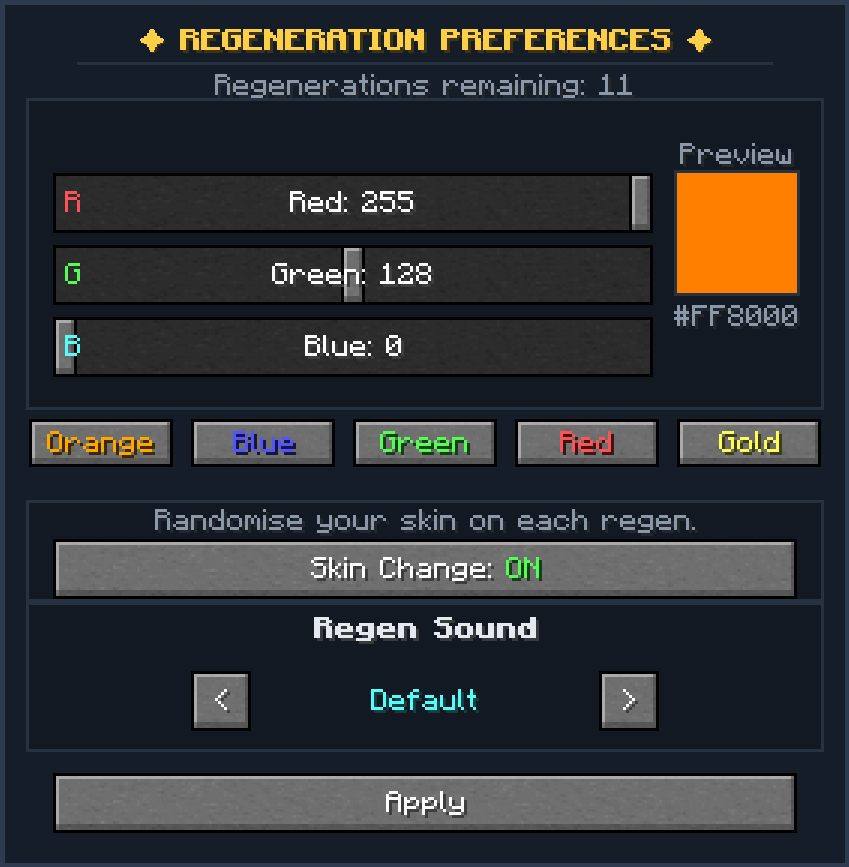
The Regeneration Preferences screen is opened with [ by default (remappable under Options → Controls → Regeneration). The screen will not open if another screen is already visible. The game does not pause while this screen is open — time continues, so close it promptly if you're in danger.
Layout
A compact settings panel that shows your current regeneration count at the top.
Controls
Control
What it does
R / G / B sliders
Set your regeneration flame colour (0–255 each). Labels read "R: X", "G: X", "B: X". A live colour preview swatch (40×40 px) and its hex code update in real time to the right of the sliders.
Preset colour buttons
Five one-click presets: Orange, Blue, Green, Red, Gold. Click one to instantly set all three sliders.
Skin Change toggle
"Skin Change: ON" / "Skin Change: OFF" — click to flip. Sends a packet to the server immediately; no need to press Apply.
Skin Reset button
Immediately resets your appearance back to your original Minecraft skin. Does the same as /regen skinreset but in one click.
< / > arrows
Cycle through available regeneration versions. The current version's display name is shown between the arrows. WIP versions are automatically skipped for public players. Sends a packet to the server immediately on each click.
Apply
Saves your current R/G/B slider values as your flame colour (sends a C2S packet) and closes the screen. The skin-change toggle and version are already saved live, so Apply only affects the colour.
📌
Custom colours coming soon
Currently 5 preset colours are available: Orange, Blue, Green, Red, and Gold. Full custom hex code support is planned for a future update — for now, use the R/G/B sliders to dial in any colour you want.
⚠️
Singleplayer vs Multiplayer
In singleplayer, the game pauses while this screen is open — animation, sound, and effects all stop. In multiplayer, the game does not pause and the world continues running.
Keybinds
Both keybinds are remappable under Options → Controls → Regeneration Mod.
Default key
Action
[
Open the Regeneration Preferences GUI.
=
Voluntarily start Stage 1. Press again while pending to skip straight to Stage 2.
Items
All three items appear in the Regeneration creative tab.
Fob Watch
A permanent item that stores up to 12 regenerations. Right-click (CLOSED) to release stored regens into yourself and open the lid. Shift+right-click to deposit one regen back in. Snaps shut when full. Has a durability bar showing stored charges. Renders as a flat icon in inventory and on the ground; full 3D model when held; open-lid variant when the watch is open.
Regeneration Energy
A glowing vial of regeneration energy. Used as a crafting ingredient and can also be drunk. Drink two within a few seconds of each other to gain +1 regeneration cycle. Non-Time Lords get no effect. Always consumed on use.
TimeLord DNA
Rare loot found in TimeLord Refuge structure chests (30% chance). Crafting ingredient for Regeneration Energy. Features a 3D syringe model when held.
Fob Watch — 3D held model
TimeLord DNA — 3D held model
Steel & Raw Materials
A new tier of materials powers most of the mod's advanced crafting.
Raw Steel
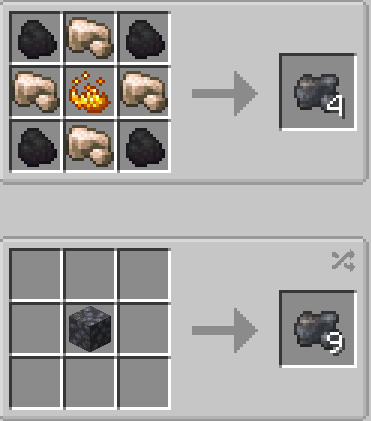
Crafted from Raw Iron, Coal and Blaze Powder. Smelt in a blast furnace to get Steel Ingots. Can also be compressed into a Raw Steel Block (9×) or decompressed back.
Steel Ingot
The core material for almost every new recipe. Made by blast-furnace smelting Raw Steel. Can be stored as a Steel Block (9×).
Xylok Cluster
Mined from Xylok Geodes underground with a diamond or netherite pickaxe. Used to craft Mr Smith.
White Point Star
Mined from White Point Ore that generates in the world. Currently a crafting ingredient used in the Chronon Core recipe.
Circuits
Circuits are the building blocks of the mod's advanced items. They're crafted in a chain: Blank Circuit → specialist circuits → advanced items.
Blank Circuit
The base for all specialist circuits. Crafted from Steel Ingots, Green Terracotta, a Comparator and Gold Nuggets.
Interface Circuit
Used in the Fob Watch, Regen Chamber, and Mr Smith. Crafted from a Blank Circuit, Steel Ingots, Redstone, a Book & Quill and a Glass Pane.
Location Circuit
Used in Mr Smith. Crafted from a Blank Circuit, Steel Ingots, Iron Nuggets and Compasses.
Personality Circuit
Used in Mr Smith and the Regeneration Matrix. Crafted from a Blank Circuit, Steel Ingots, Iron Nuggets and Soul Sand.
Regeneration Circuit
Used in the Fob Watch and Regen Chamber. Crafted from a Blank Circuit, Steel Ingots, Blaze Powder and Regeneration Energy.
Advanced Components
Chronon Core
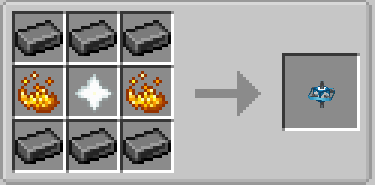
A White Point Star trapped in a steel accelerator. Used in the Fob Watch and Regeneration Matrix. Crafted from Steel Ingots, Blaze Powder and a White Point Star.
Regeneration Matrix
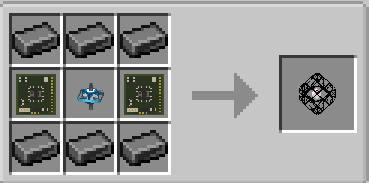
The core component for the Regeneration Chamber. Crafted from Steel Ingots, a Chronon Core and two Personality Circuits.
Drinking Regeneration Energy
Regeneration Energy has a hidden two-vial mechanic for Time Lords:
First vial — drink animation plays, vial is consumed, nothing happens gameplay-wise. A follow-up window opens (default 5 seconds, configurable via energyVialFollowUpSeconds).
Second vial within the window — grants +1 regeneration cycle (capped at your max of 12). The action bar confirms: "The second dose stabilises — +1 regeneration."
Already at max regens — second vial is consumed with no extra effect: "Your regenerations are already at maximum."
Window expired — treated as a fresh first drink; the window resets.
Non-Time Lords — vial is consumed, nothing happens.
💡
Alternative to the Fob Watch
Two vials drunk quickly is the only way to restore a regeneration cycle without a Fob Watch charge. Useful mid-game if your watch is empty and you have spare vials from crafting.
Recipes
Regeneration Energy
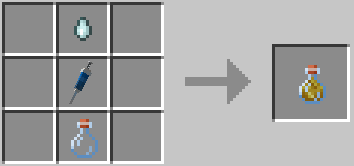
Shapeless — place all three items anywhere in the crafting grid:
Ghast Tear
TimeLord DNA
Glass Bottle
🧬 1× TimeLord DNA
💧 1× Ghast Tear
🫙 1× Glass Bottle
→ 1× Regeneration Energy
Raw Steel
Shaped — gives 4× Raw Steel:
Coal
Raw Iron
Coal
Raw Iron
Blaze Powder
Raw Iron
Coal
Raw Iron
Coal
⬛ 4× Coal
🟫 4× Raw Iron
🔥 1× Blaze Powder
→ 4× Raw Steel
Steel Ingot
Blast Furnace — smelt Raw Steel to get Steel Ingots (1 per Raw Steel).
Blank Circuit
Green Terracotta
Green Terracotta
Gold Nugget
Steel Ingot
Comparator
Gold Nugget
Green Terracotta
Green Terracotta
Gold Nugget
🟩 4× Green Terracotta
⚙️ 1× Steel Ingot
🔲 1× Comparator
⭕ 3× Gold Nugget
→ 1× Blank Circuit
Interface Circuit
Steel
Redstone
Steel
Book&Quill
Blank Circuit
Glass Pane
Steel
Redstone
Steel
⚙️ 4× Steel Ingot
🔴 2× Redstone
📖 1× Book & Quill
🪟 1× Glass Pane
🟩 1× Blank Circuit
→ 1× Interface Circuit
Location Circuit
Steel
Iron Nugget
Steel
Compass
Blank Circuit
Compass
Steel
Iron Nugget
Steel
⚙️ 4× Steel Ingot
🧲 2× Iron Nugget
🧭 2× Compass
🟩 1× Blank Circuit
→ 1× Location Circuit
Personality Circuit
Steel
Iron Nugget
Steel
Soul Sand
Blank Circuit
Soul Sand
Steel
Iron Nugget
Steel
⚙️ 4× Steel Ingot
🧲 2× Iron Nugget
🏜️ 2× Soul Sand
🟩 1× Blank Circuit
→ 1× Personality Circuit
Regeneration Circuit
Steel
Blaze Powder
Steel
Regen Energy
Blank Circuit
Regen Energy
Steel
Blaze Powder
Steel
⚙️ 4× Steel Ingot
🔥 2× Blaze Powder
⚗️ 2× Regeneration Energy
🟩 1× Blank Circuit
→ 1× Regeneration Circuit
Chronon Core
Steel
Steel
Steel
Blaze Powder
White Point Star
Blaze Powder
Steel
Steel
Steel
⚙️ 6× Steel Ingot
🔥 2× Blaze Powder
⭐ 1× White Point Star
→ 1× Chronon Core
Regeneration Matrix
Steel
Steel
Steel
Personality Circuit
Chronon Core
Personality Circuit
Steel
Steel
Steel
⚙️ 6× Steel Ingot
🔵 2× Personality Circuit
💙 1× Chronon Core
→ 1× Regeneration Matrix
Fob Watch
Shaped — the exact layout matters:
Steel
Steel
Steel
Regen Circuit
Chronon Core
Interface Circuit
Steel
Steel
Steel
⚙️ 6× Steel Ingot
🔴 1× Regeneration Circuit
💙 1× Chronon Core
🟢 1× Interface Circuit
→ 1× Fob Watch
⚠️
The recipe has completely changed
The old Iron Ingot + Dragon Breath recipe no longer exists. You now need Steel Ingots, a Regeneration Circuit, a Chronon Core and an Interface Circuit — all part of the new crafting chain.
Structures
RegenCraft adds several structures to the world. Some are directly linked to the mod's progression, others are rare finds that reward exploration.
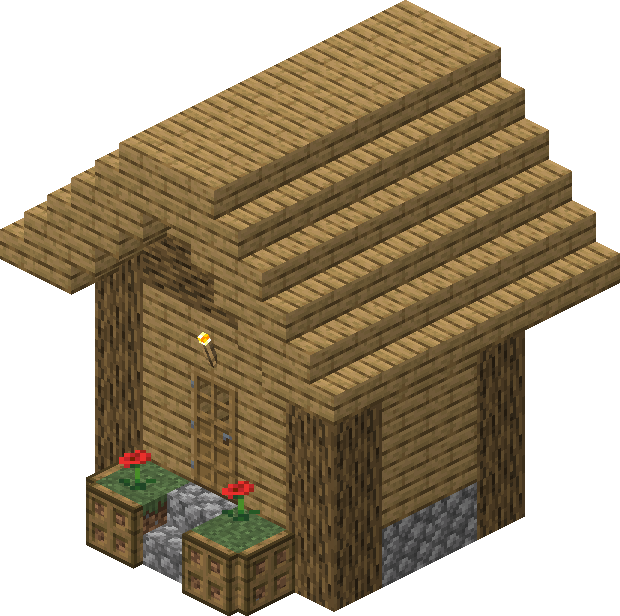
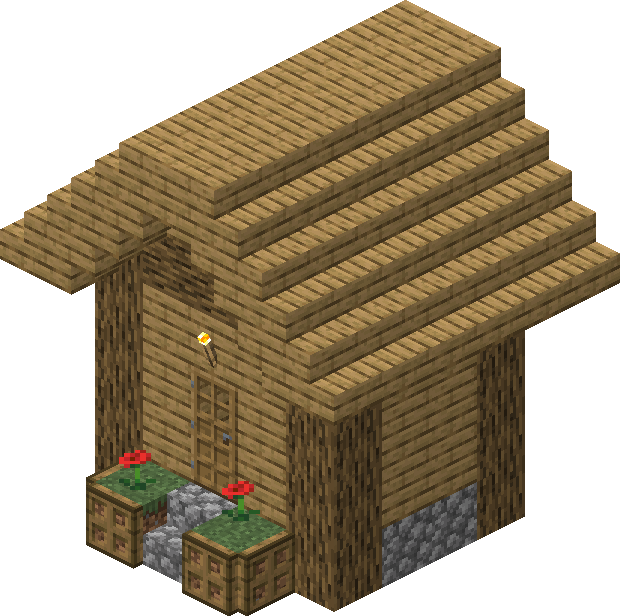
timelord_hut
Time Lord Refuge
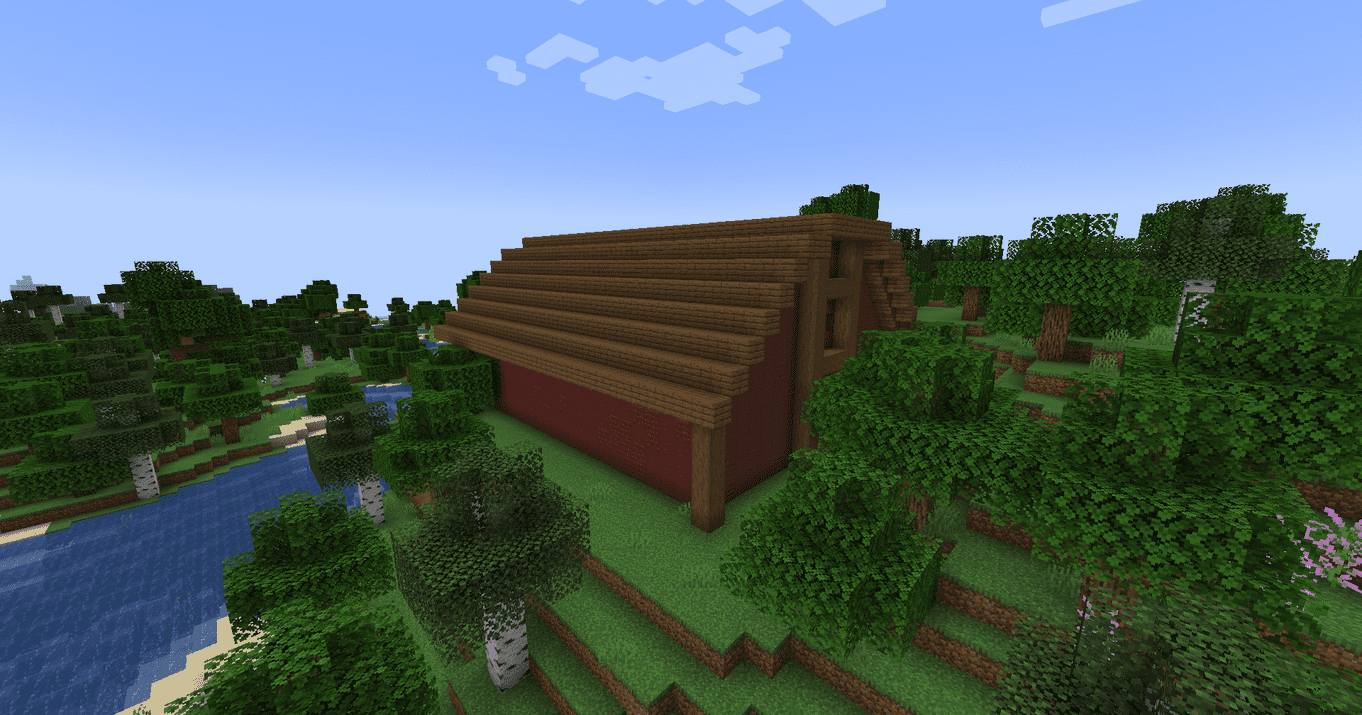
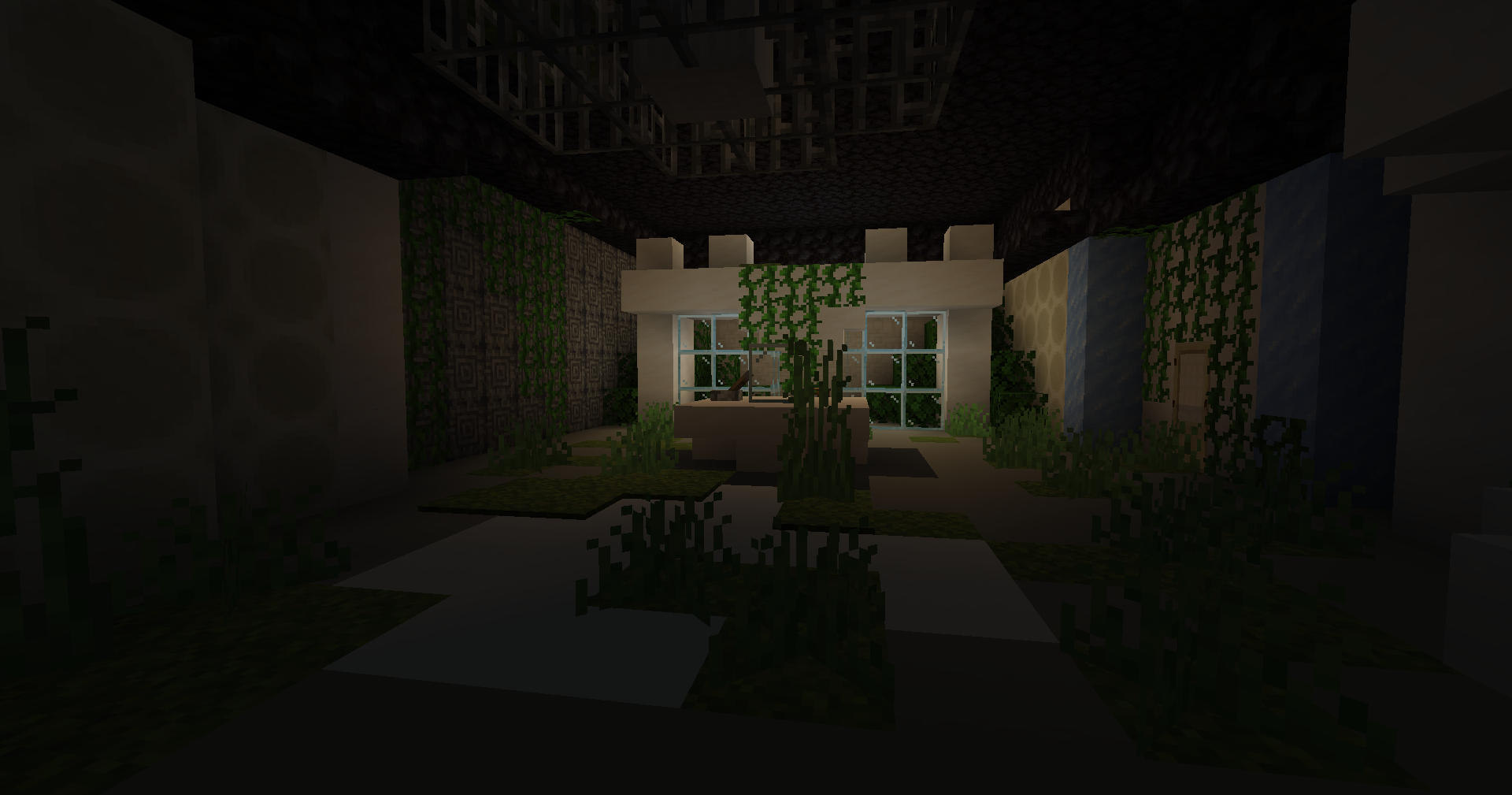
A small hut generating rarely across most overworld surface biomes: plains, forests, taiga, desert, savanna, meadow, and more.
type40_mark1
Type 40 Mark 1
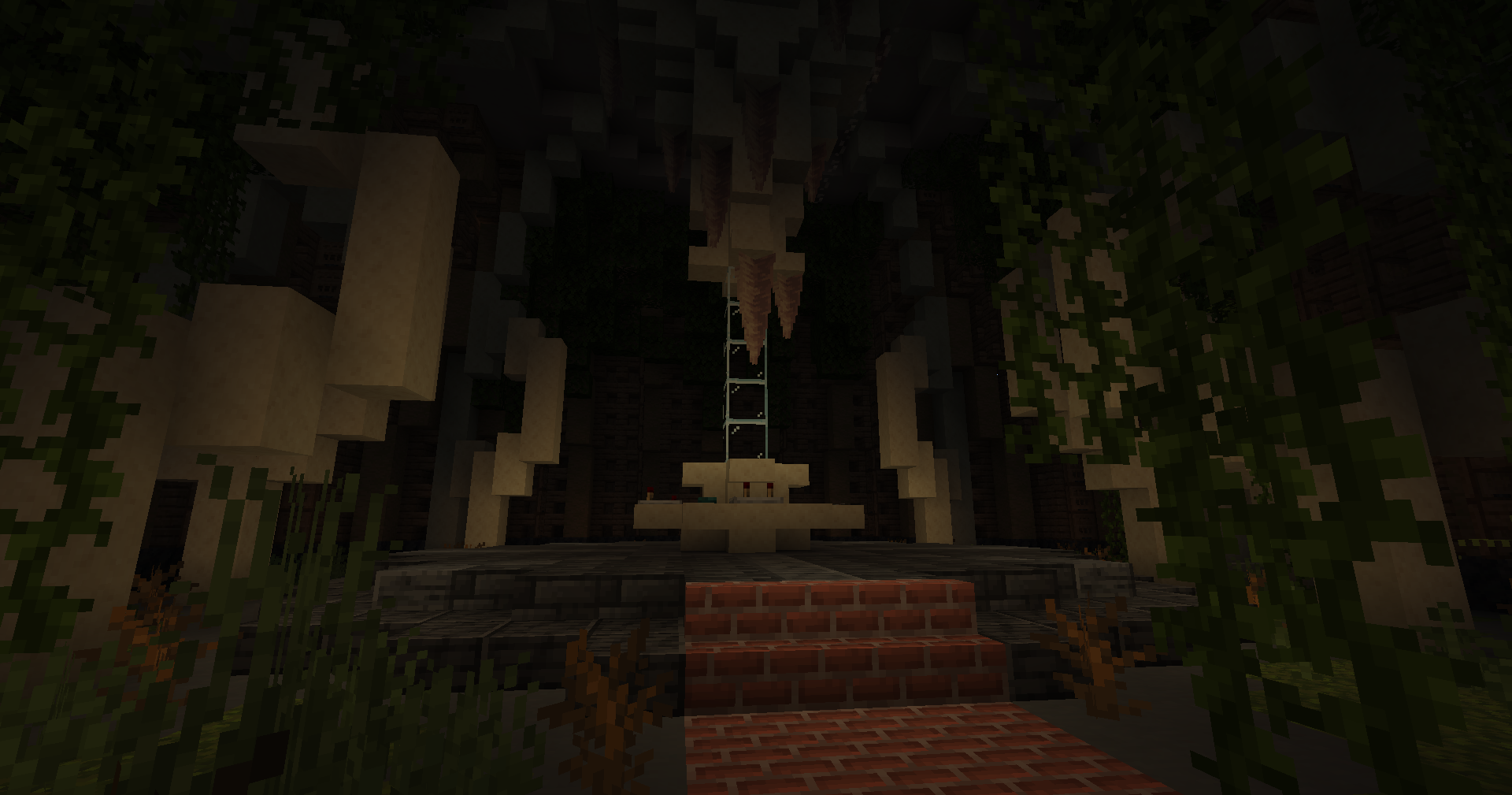
A TARDIS-style structure generating in the overworld. Contains a loot chest worth visiting even without DNA.
type40_mark9-10
Type 40 Mark 9-10
A later TARDIS variant. Generates alongside the Mark 1 using its own loot table.
📌
More structures coming
Additional structures are planned for future updates. Check back here as the mod grows.
Xylok Geode
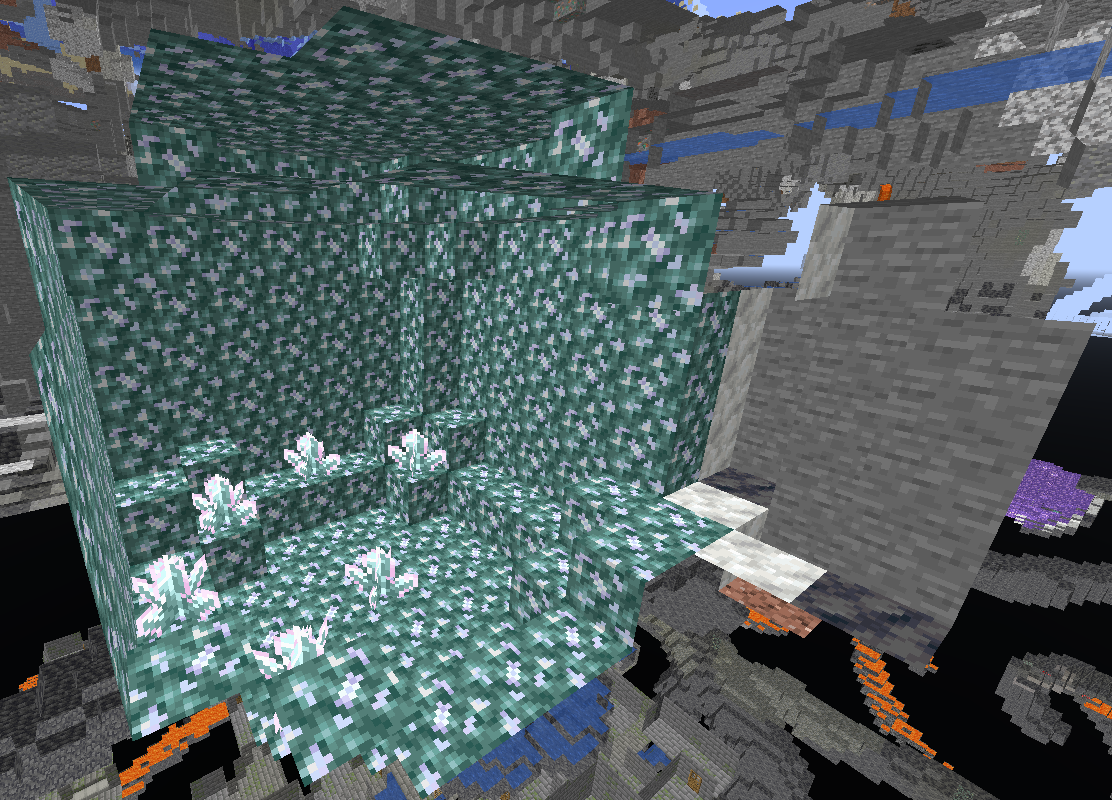
A large geode structure that generates underground in the overworld, similar to Amethyst Geodes. The inside is lined with Block of Xylok and contains Xylok Clusters growing from the floor and walls. Mine the clusters with a diamond or netherite pickaxe to collect Xylok Cluster items, which are needed to craft Mr Smith.
Meteor
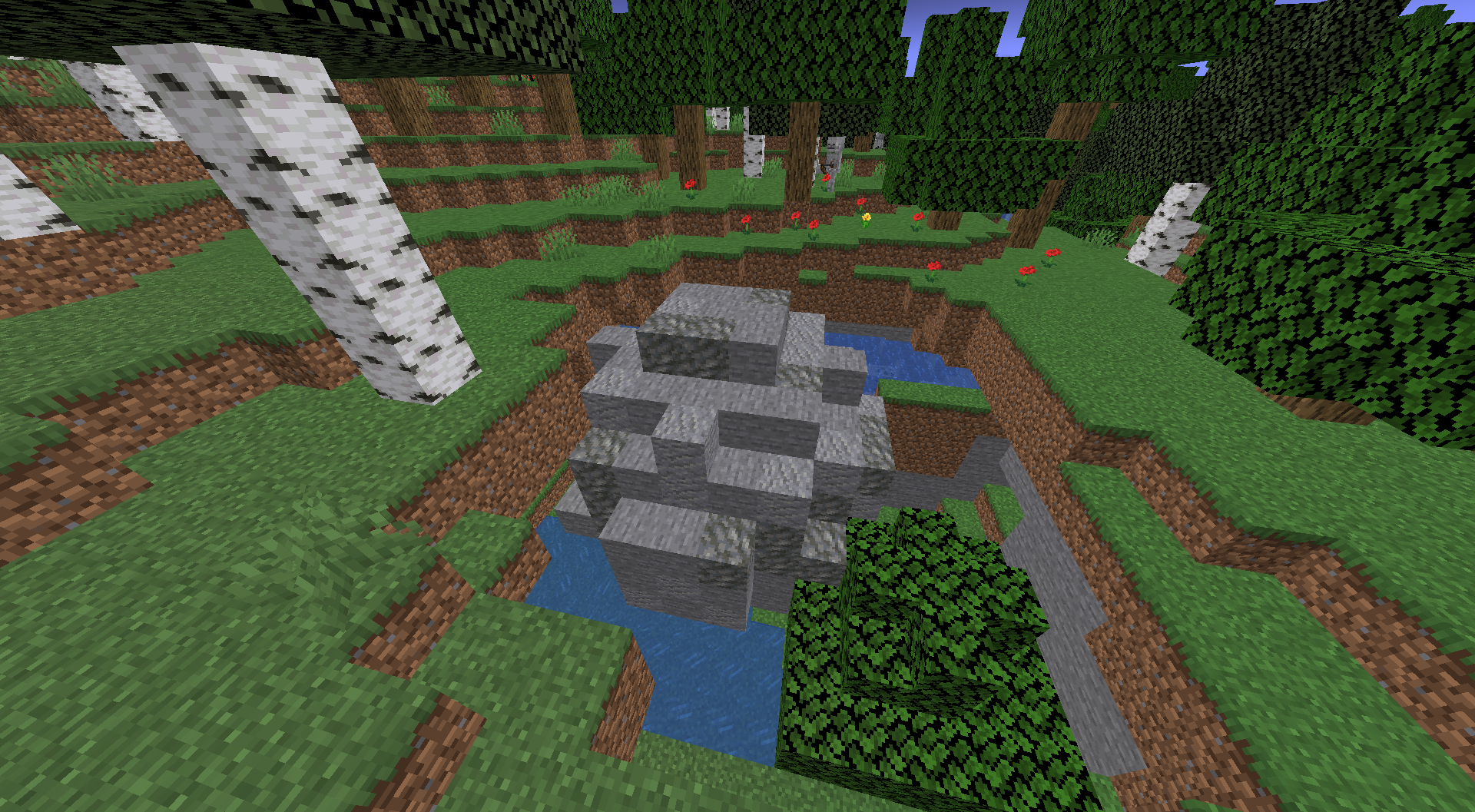
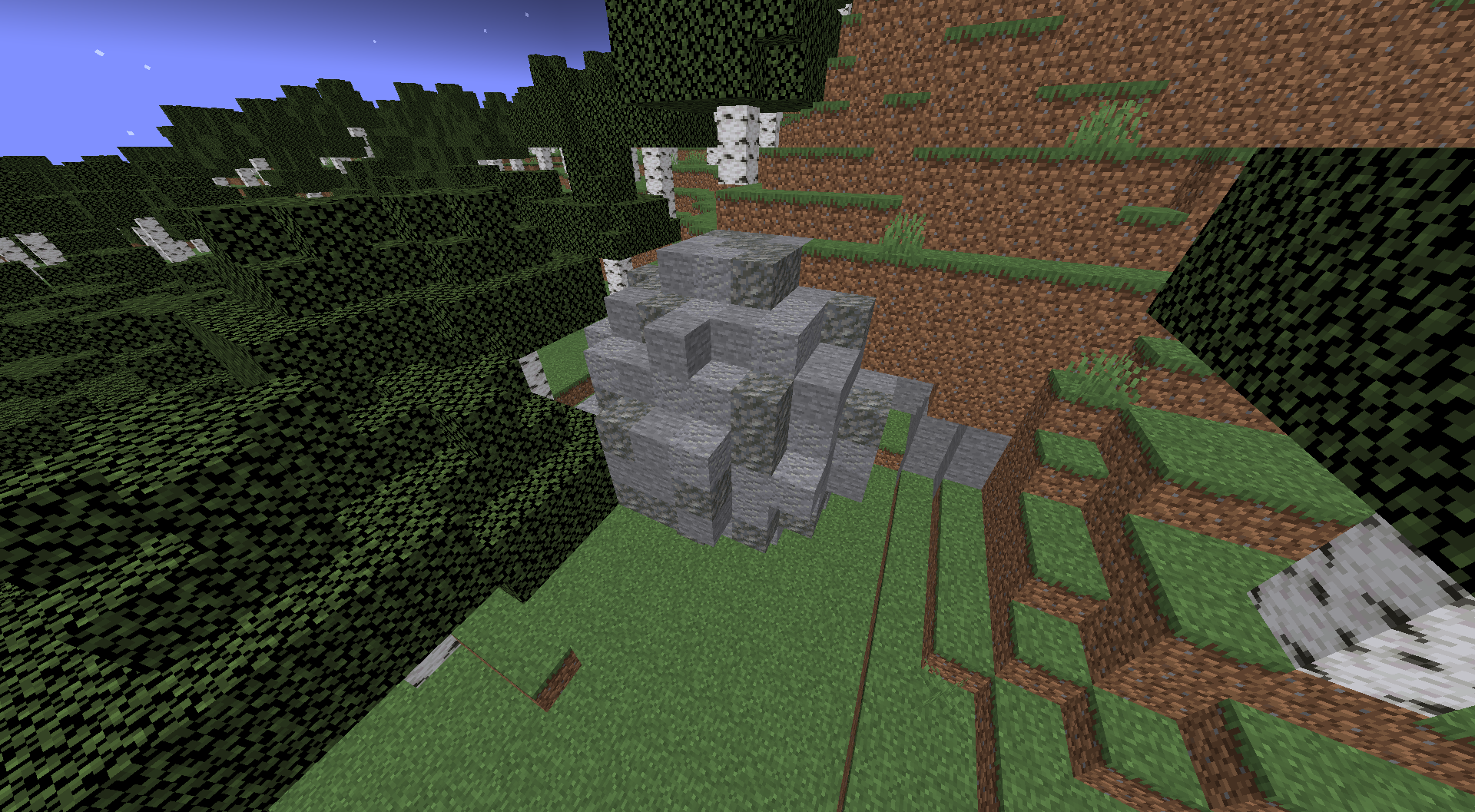
A rare surface structure consisting of a jagged pile of stone — the remnants of something that fell from above. Two variants exist. Meteors cannot be located by Mr Smith and can only be found through pure exploration.
Loot Tables
Each structure contains one chest. The Time Lord Refuge loot table:
Pool
Drop
Chance / Quantity
Primary
TimeLord DNA
30% (configurable via dnaLootChancePercent)
Primary
Gold Ingots
75%, 1–4 ingots
Bonus (2–4 rolls)
Clock, Glass Bottle, Ghast Tear
Varies
Bonus (2–4 rolls)
Emerald, Iron Ingot, Redstone, Bread
Varies
Bonus (2–4 rolls)
Enchanted Book
Varies
💡
Always worth visiting
Even if you don't get DNA (70% of the time you won't), the bonus loot pool ensures every hut yields useful vanilla items. Keep exploring — most players need 3–5 huts before crafting a watch.
Advancements
RegenCraft adds 22 advancements across two phases — the original regeneration milestones, and a new crafting progression chain.
Getting Started
Time Lord Refuge
"Find TimeLord DNA"
Obtain TimeLord DNA from a structure chest for the first time.
A Watch with a Secret
"Craft a Fob Watch"
Craft your first Fob Watch.
Someone's Not Taking Chances
"Craft a second Fob Watch"
Craft a second watch — likely to store or share regenerations.
Allons-y!
"Become a Time Lord"
Activate Time Lord status for the first time by opening a Fob Watch.
Milestones
New Face, Who Dis?
"Survive 3 regenerations"
Complete 3 full regeneration cycles.
Getting Through Them
"Survive 8 regenerations"
Complete 8 full cycles.
The Final Body
"Survive all 12 regenerations"
Use every last regeneration cycle.
Time Lords Don't Do Rules
"Regenerate more than 12 times"
Somehow exceed the standard 12-regeneration limit.
Crafting Progression
🏭
Age of Machines!
"Smelt Raw Steel using the blast furnace"
Your first Steel Ingot — the start of the new crafting chain.
The Power of The Doctor
"The power of regeneration, in the palm of your hand"
Craft your first Regeneration Circuit.
Interfacing Machinery
"Crafted the Interface Circuit"
Craft your first Interface Circuit.
Personality Loading...
"Crafted the Personality Circuit"
Craft your first Personality Circuit.
Location. Location. Location.
"Crafted the Location Circuit"
Craft your first Location Circuit.
Going Chronon
"Crafted the Chronon Core"
Craft your first Chronon Core.
Advancing Regeneration
"Crafted the Regeneration Matrix"
Craft the Regeneration Matrix.
Mr Smith I Need You!
"Crafted Mr Smith"
Craft Mr Smith for the first time.
The Chamber of Change
"Crafted the Regeneration Chamber"
Craft the Regeneration Chamber — your gateway to the Evolution skill tree.
⭐
the White Point Star
"Now the star is mine. I can increase the signal and use it as a lifeline."
Mine a White Point Star from White Point Ore for the first time.
The Story Continues
"Mined the Xylok Cluster"
Mine a Xylok Cluster from a Xylok Geode for the first time.
Challenges
Not Today
"Use every delay"
Use all 3 countdown extensions in a single Stage 1.
The Grace Period Expired
"Fell before the energy took hold"
Die during Stage 1 — environmental damage can still kill you while pending.
Regeneration Denied
"The new body never got a chance"
Die during Stage 2 while the active sequence is playing.
Commands
Root command: /regeneration · Alias: /regen
Any Player
No permission required
/regeneration info [player]Full status dump: Time Lord status, regen count, current stage, flame colour, skin index, skin-swap setting, version.
/regeneration versionShows your current regeneration version ID.
/regeneration version <name>Sets your regeneration version. Only versions accessible to your account are accepted (public players can only set public versions).
/regeneration skinswapShows whether skin-swap is ON or OFF for you.
/regeneration skinswap on|offEnable or disable skin changing on regeneration.
/regeneration skinresetResets your appearance back to your original Minecraft skin, clearing any Time Lord skin currently applied.
/regeneration flamecolor <r> <g> <b>Set your particle colour by RGB (0–255 each).
/regeneration add <player> <n>If not a Time Lord: activates them with <n> regenerations. If already a Time Lord: adds <n> to their current count (capped at max).
/regeneration set <player> <n>Sets regeneration count directly to <n> (0–12). Also sets timelord=true if n > 0.
/regeneration reset <player>Strips Time Lord status entirely, sets regen count to 0, and restores the player's original skin.
/regeneration quality <quality>Sets the quality (standard/perfect/failed/master) for the next regeneration only. Consumed after one use.
Senior Admin Commands (Op Level 4)
Op Level 4
/regeneration trigger <player>If the player is pending (Stage 1): cancels the countdown and begins Stage 2 immediately. Otherwise starts an active regeneration sequence directly, consuming one cycle.
/regeneration skipInstantly ends your current regeneration or pending countdown. The cycle is still consumed, skin still changes, but animation and audio are cut immediately.
/regeneration bypass <on|off>Enables or disables the grace period for yourself. on clears the current timer and lets you voluntarily regenerate again immediately. off re-enables the grace period.
/regeneration configDisplays all current config values for this world (grace period, max regens, extensions, particle density, etc.).
/regeneration config <key> <value>Sets a config value and saves it immediately — no server restart needed. See the Configuration page for all valid keys.
/regeneration ep <player> set <amount>Set a player's Evolution Points directly to a specific value.
/regeneration skilltreeOpen the Evolution skill tree GUI for yourself.
/regeneration skilltree grant <evolution>Grant any evolution directly, bypassing cost and prerequisites. Supports wildcards.
/regeneration skilltree revoke <evolution>Revoke an evolution and anything that depended on it. No EP is refunded.
Configuration
RegenCraft uses a per-world config file stored at <world folder>/regencraft.json. Each world or server save keeps its own settings. The file is created with defaults the first time a world loads. Changes via /regen config apply immediately without a restart and are saved to this file automatically.
💡
Live config changes
Use /regen config <key> <value> (op level 4) to change any value while the server is running. No restart needed. Run /regen config with no arguments to see all current values.
Config Keys (regencraft.json)
Key
Default
Effect
graceSeconds
180 (3 min)
Seconds a player must wait after completing a regeneration before voluntarily triggering another with =.
maxRegens
12
Maximum regenerations a Time Lord can hold.
maxDelays
3
How many times a player can empty-hand punch a block to extend the Stage 1 countdown.
particles
1.0
Multiplier for particle counts during regeneration.
watchRecipe
true
If false, the Fob Watch crafting recipe is disabled.
volume
1.0
Multiplier for all regeneration sound volumes.
dnaChance
30
Percent chance (0–100) for TimeLord DNA to appear in a Time Lord Refuge chest.
vialWindow
5.0
Seconds allowed between drinking two Regeneration Energy vials to gain +1 regeneration cycle.
roleplay
false
Roleplay mode. When true, Mr Smith never auto-closes and the Regen Chamber doors never auto-close — everything must be closed manually via chat or right-click.
maxEP
150
Maximum Evolution Points a player can hold at once.
chance
master=3, perfect=15, failed=20
Percent chance for each non-Standard quality. Set via /regen config chance <master|perfect|failed> <amount>. Whatever remains after the three adds up is Standard (default 62%).
Per-Player Settings
These are stored server-side per player in RegenerationData and are changed in-game, not via the config file.
Setting
Change via
Default
Flame colour (R/G/B)
Preferences GUI or /regeneration flamecolor
Orange (#FF8000)
Skin change on regen
Preferences GUI or /regeneration skinswap
ON
Regeneration version
Preferences GUI or /regeneration version
default (~54s)
Hardcoded Constants
One value is not yet configurable via the config file and requires recompiling to change:
Constant
Value
Location
PENDING_SEGMENT_TICKS
600 ticks (30 s)
RegenerationData.java — length of each Stage 1 countdown segment including extensions.
For Developers
RegenCraft is open source under LGPL-3.0.
Architecture Overview
Package
Responsibility
component/
Core data model (RegenerationData) and in-memory per-player store.
Pool of 43 Time Lord skins, random-index picker (always picks a different one).
world/
Anchor for datapack-driven worldgen (3 structures).
mixin/
Death hook, player render hooks, skin override, title-screen logo.
Key Extension Points
New regen version — add to VERSIONS[] / DURATIONS_TICKS in RegenerationVersions.java, add .ogg, register sound event.
Post-regen effects / traits — hook into RegenerationHelper.applyPostRegenEffects().
Adjust Stage 1 timing — PENDING_SEGMENT_TICKS and PENDING_MAX_EXTENSIONS in RegenerationData.
Custom HUD ring — replace PendingRegenOverlay; getPendingProgress(), getPendingTimer(), and getPendingExtensionsRemaining() are exposed.
New structures — follow the timelord_hut pattern: structure_set + structure + template_pool + .nbt + loot table.
Per-version visuals — branch on RegenerationData.getRegenerationVersion() for distinct particle colours, skin pools, or other effects.
Data Flow
Player takes fatal damage
   │
   ▼
ServerLivingEntityEvents.ALLOW_DEATH
   ├─ Not a Time Lord / 0 regens → Allow death (vanilla)
   └─ Time Lord + regens > 0 ──────────────────────────┐
                                                        ▼
                                          STAGE 1: PENDING
                                          data.startPending()
                                          applyImmediateRegenHealing()
                                          Cancel the death (return false)
                                          ┌─ countdown ticks (600 per segment)
                                          ├─ punch block → extend timer
                                          ├─ [=] key / trigger cmd → skip
                                          └─ timer reaches 0
                                                        │
                                                        ▼
                                          STAGE 2: ACTIVE
                                          data.tryRegenerate() → consumes 1 cycle
                                          lockMovement(durationTicks)
                                          playSound(version sound)
                                          camera → THIRD_PERSON_FRONT
                                          ┌─ particles scale with progress
                                          ├─ watchdog runs every tick
                                          └─ timer reaches durationTicks
                                                        │
                                                        ▼
                                          COMPLETE
                                          fullHeal() · unlockMovement()
                                          applyPostRegenEffects()
                                          if skinChangeEnabled → broadcastSkin()
                                          syncToClient()
Regeneration Quality
Every time a regeneration completes, a quality is rolled. Each quality carries lasting effects — on your max health, your flame colour, ongoing status effects, and more — that stay with you until your next regeneration.
📌
Effects are permanent for this incarnation
The health modifier from quality persists until your next regeneration replaces it. You cannot remove it early without an admin command.
Quality Types
⚪
Standard
62% chance
No change to health, no announcement. The regeneration just happens.
💚
Perfect
15% chance
+6 max health (3 extra hearts). Flame colour shifts slightly brighter. You receive a quiet personal message: "This regeneration feels perfect." While active, you carry a permanent Luck effect.
💔
Failed
20% chance
-2 max health (1 heart lost). Flame colour shifts duller. You receive a quiet personal message: "Something went wrong. This regeneration feels... off." While active, you carry a permanent Bad Luck effect.
Master
3% chance
No health change. A server-wide bold purple message broadcasts: "[Name] can hear the never ending drums." A dramatic sound plays for you privately. While this quality is active you carry the Madness effect — a ghostly semi-transparent figure named Koschei appears roughly 25 blocks away, visible only to you. It vanishes if you get too close, move too far, or look directly at its head. Every 5 minutes you are hit with Nausea and Strength simultaneously for 10 seconds.
How it interacts with Evolutions
Quality also affects how long Stage 2 lasts. A Perfect regeneration is 15% faster than normal. A Failed one takes 15% longer. These stack with any Biological evolution bonuses you have active.
Admin Override
Operators can force a specific quality for the next regeneration using /regen quality <standard|perfect|failed|master> (op level 2). The override is consumed on the next regen and does not persist to future ones.
Evolution System
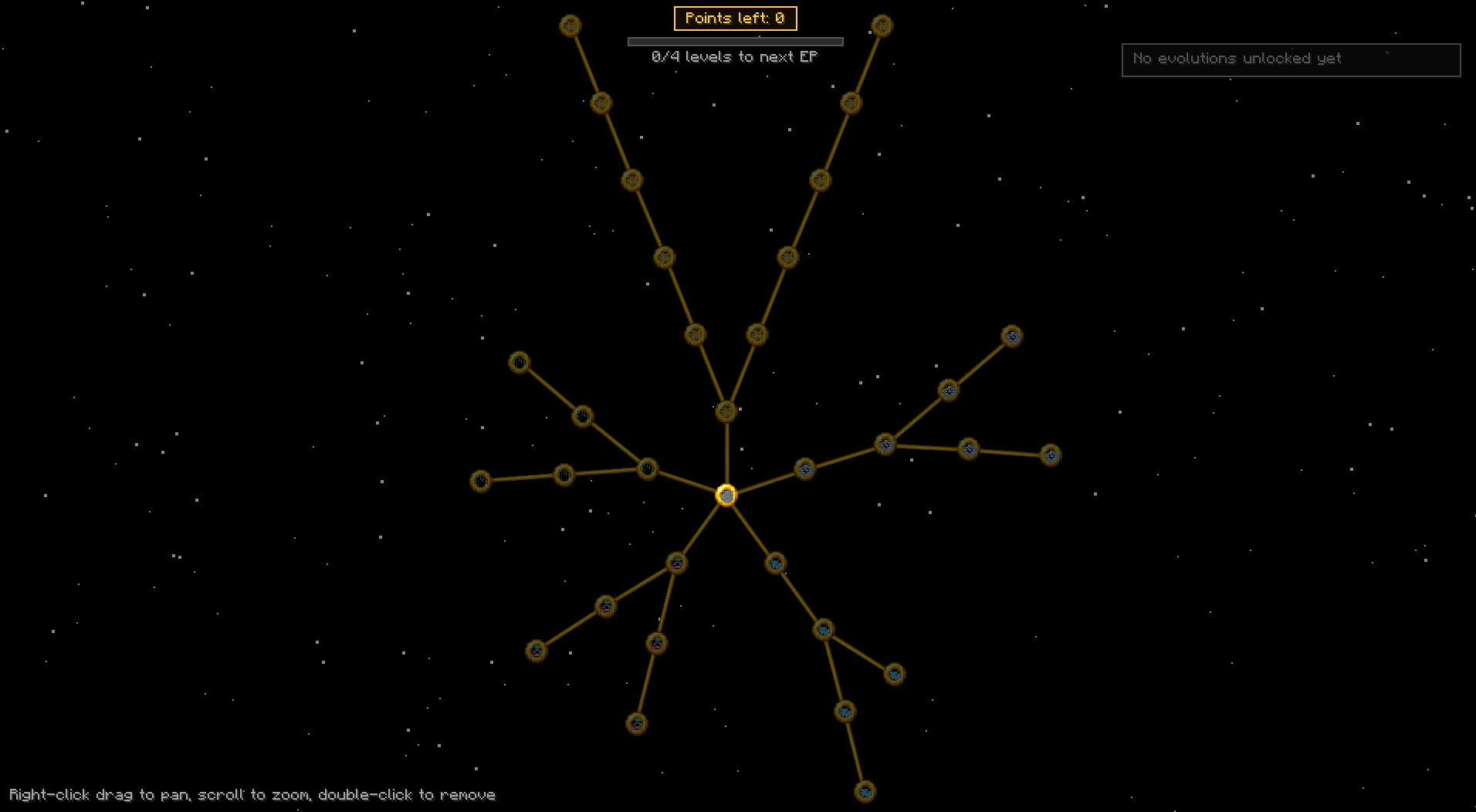
The Evolution System is RegenCraft's progression tree. As a Time Lord you earn Evolution Points (EP) by levelling up in XP, then spend them inside the Regeneration Chamber on permanent upgrades for your next incarnation.
⚠️
Evolutions activate on your NEXT regeneration
Buying an evolution in the skill tree does not grant its effect immediately. It only activates when your next regeneration completes. Plan accordingly — if you buy something new, you need to regenerate before it kicks in.
Earning Evolution Points
Every 4 XP levels you reach as a Time Lord grants 1 EP. The system tracks your highest ever XP level — spending XP on enchanting afterwards never takes EP back. You hold up to 150 EP at once (configurable). When you gain EP, you see a message in the action bar: "Your biodata grows more complex — +1 EP."
Opening the Skill Tree
You must be inside a Regeneration Chamber with both doors closed for at least 2 seconds. The GUI opens automatically once you're sealed in. Operators can also use /regen skilltree (op 4) to open it directly.
How Costs Work
Each evolution has a base EP cost. Every 3 evolutions you already own adds +1 EP to the cost of everything you haven't bought yet — so early picks stay cheap but filling out the whole tree is a real investment.
The Six Routes
All routes branch from The Watch Opens (free, no prerequisites — claim it first). Each route's first node requires it.
Haste (faster mining), attack speed boost, Blink of an Eye (survive a fatal hit once every 10 min), reduced surprise damage
Artron
Regeneration energy in the body
Passive hunger restore, faster natural healing, chance to gain EP on boss kills, slow enemies on melee hits
Adaptive
Surviving harsh environments
Fire & lava immunity, water breathing, swim faster, never freeze
Matrix
Time Lord knowledge and crafting
Auto-smelt ores on mine, fortune bonus on drops, XP orb attraction range
WIP Evolutions
Some evolutions show as WIP in the skill tree. They're visible so the tree looks complete, but cannot be unlocked normally — they're coming in a future update:
Stable Regeneration — Resist regeneration going wrong (corruption system not yet built)
Swift Renewal — Maximum regen speed tier (coming soon)
Precognition — Sense danger before it strikes (needs special rendering work)
Matrix Fabrication — Occasionally craft without using materials (needs a crafting hook)
Trial by Fire — Fully at home in extreme heat (effect not matching name yet)
Removing Evolutions
You can remove evolutions you've already unlocked. In the skill tree GUI, double-click a node you own to remove it. Be aware of two things:
Cascade removal — removing an evolution also removes anything that depended on it as a prerequisite, so the tree stays valid.
No EP refund — spent EP is not returned when you remove an evolution.
One-time reward nodes cannot be removed (to prevent farming the reward repeatedly).
Removed evolutions still deactivate on your next regeneration, same as unlocking — the change takes effect when you next regenerate.
Admin Commands
Skill Tree (Op Level 4)
/regen skilltreeOpen the skill tree GUI for yourself.
/regen skilltree grant <evolution>Grant any evolution to yourself, bypassing cost and prerequisites. Supports wildcards.
/regen skilltree revoke <evolution>Remove an evolution and anything that depended on it (cascade). No EP is refunded.
/regen ep <player> set <amount>Set a player's EP directly.
Regeneration Chamber
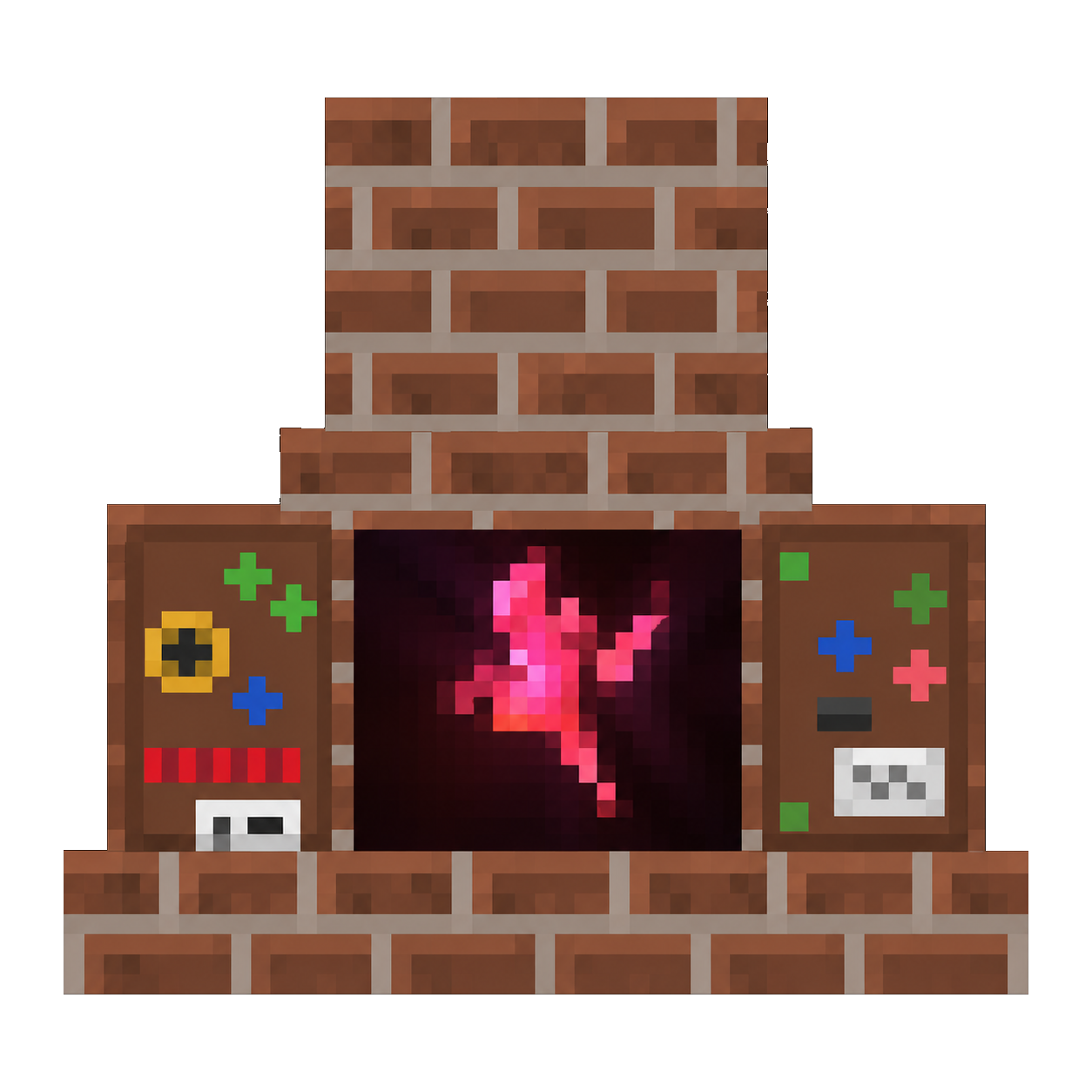
The Regeneration Chamber is a craftable block that Time Lords use to access the Evolution skill tree. It's the only way for non-operator players to open the skill tree GUI.
How to Use It
Place the Regeneration Chamber in the world.
Right-click one of the doors to open it.
Walk inside so you're standing in the chamber.
Right-click the door again to close it. Both doors must be closed.
After 2 seconds the Skill Tree GUI opens automatically.
Shift-click to exit the chamber and close the GUI.
💡
Roleplay mode
In roleplay mode (configurable), the chamber doors never auto-close from walking away — only an explicit right-click closes them. This keeps things immersive on roleplay servers.
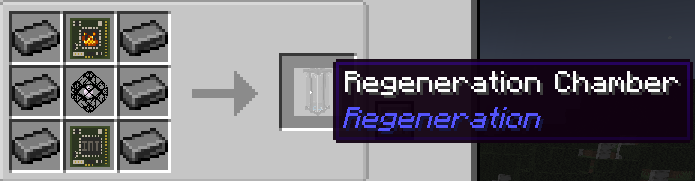
Recipe
Steel
Regen Circuit
Steel
Steel
Regen Matrix
Steel
Steel
Interface Circuit
Steel
⚙️ 6× Steel Ingot
🔴 1× Regeneration Circuit
💙 1× Regeneration Matrix
🟢 1× Interface Circuit
→ 1× Regeneration Chamber
Mr Smith
Mr Smith is a placeable block and interactive computer. You can ask him to locate any structure in the Minecraft world — vanilla or RegenCraft — and he will give you the exact coordinates.
Activating Mr Smith
Place Mr Smith in the world.
Stand within 3 blocks of him.
Type in chat: mr smith i need you
The chat message is swallowed by the mod — other players won't see it.
Mr Smith plays an animation and opens up.
Right-click the block to open the structure locator GUI.
Finding a Structure
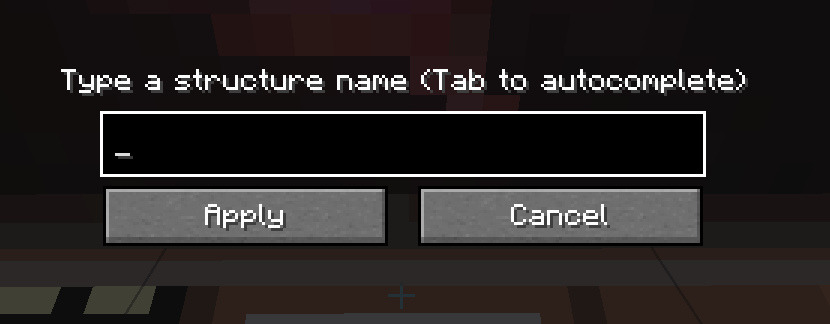
The GUI shows a text field — type any structure name and press Tab to autocomplete, then click Apply. Mr Smith can locate any vanilla Minecraft or RegenCraft structure, searching within 100 chunks. He'll reply in chat with the exact coordinates.
📌
Meteors cannot be located
Mr Smith cannot find the Meteor structures — those are meant to be discovered through exploration only.
Closing Mr Smith
Type mr smith close in chat (within 3 blocks) to close him. He also auto-closes if nobody is within range for more than 60 seconds — unless roleplay mode is enabled, in which case only the chat phrase closes him.
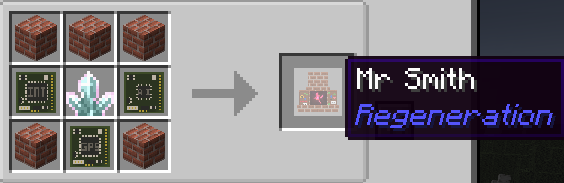
Recipe
Bricks
Bricks
Bricks
Interface Circuit
Xylok Cluster
Personality Circuit
Bricks
Location Circuit
Bricks
🧱 5× Bricks
🟢 1× Interface Circuit
💙 1× Xylok Cluster
🔵 1× Personality Circuit
🟢 1× Location Circuit
→ 1× Mr Smith
Centennial Trophy
The Centennial Trophy is a decorative block automatically awarded to a player when they complete their 100th regeneration. It drops directly into their inventory — no admin involvement needed.
💡
A rare achievement
Reaching 100 regenerations requires using a lot of Fob Watches over a long period of time. The trophy is a permanent in-world memento of the milestone.
The trophy can be placed anywhere in the world. It requires a pickaxe to break and drop properly. It's purely decorative — it grants no gameplay effect when placed.

 Regen Versions
 Skins
Skins Preferences GUI
 Evolutions
 Regen Chamber
 Mr Smith
 Items
Items Recipes
 Structures
 Regenerations
12 per watch
Regenerations
12 per watch
 Bundled skins
43
Bundled skins
43
 Stage 1 delay
Up to 2 min
Stage 1 delay
Up to 2 min
 Structures
5 types
Structures
5 types
 Advancements
22
Advancements
22